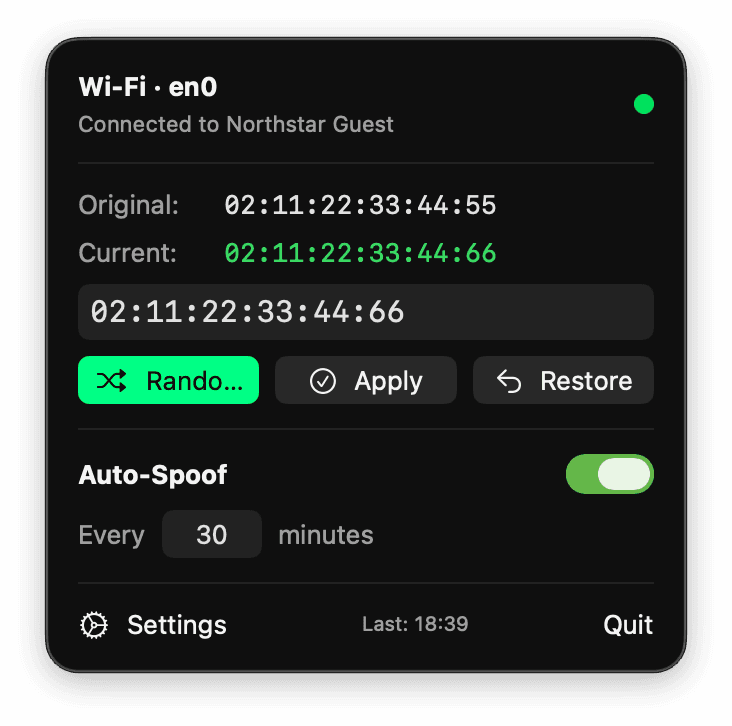
Smart Randomization
Generate compliant locally-administered unicast MAC addresses in one click. Proper bit flags, proper format, every time.
Randomize, set, rotate, and restore your Wi-Fi MAC address from a native macOS menu bar instrument. No terminal workflow and no background daemon.
Explore the WiFiSpoof flow with simulated interfaces and addresses. Everything stays in this browser; this sample never reads or changes your network settings.
Ready to create a simulated private address.
Inside the product
Inspect the active Wi-Fi identity and replace or rotate its MAC address from a focused menu-bar control.
Changing your MAC on macOS means multiple shell commands, admin prompts, and manual reconnection. WiFiSpoof replaces all of that with a single click from your menu bar.
WiFiSpoof does MAC address management on macOS and nothing else. No bundled VPN, no unrelated extras.
Generate compliant locally-administered unicast MAC addresses in one click. Proper bit flags, proper format, every time.
Set an interval and let WiFiSpoof rotate your MAC automatically in the background. A visible countdown shows when the next rotation happens.
Your real hardware MAC is detected automatically via CoreWLAN and always visible. Restore it with one click when you need your original identity back.
The menu bar icon changes to reflect your state: normal, spoofed, or auto-rotating. Open the popover to see current MAC, hardware MAC, and last spoof timestamp.
Built with SwiftUI. Lives in your menu bar, launches at login, sends native notifications. No Electron, no web wrappers — a real Mac app.
Need a specific address? Type or paste any MAC in standard formats. WiFiSpoof validates and applies it through the same secure flow.
WiFiSpoof stays out of your way until you need it.
WiFiSpoof lives in your macOS menu bar. Click to see your current MAC, hardware MAC, and connection status instantly.
Hit Randomize for an instant new identity, or type a specific address. WiFiSpoof handles the privilege prompt and reconnection.
Enable auto-spoof to rotate your MAC at a set interval. WiFiSpoof runs quietly in the background with a countdown until the next change.
Set an interval and WiFiSpoof cycles your MAC address on schedule — useful when a hotspot meters its free sessions by MAC.
Yes. macOS requires elevated permissions to change a network interface's MAC address. WiFiSpoof uses the standard macOS system dialog to request admin privileges — no third-party elevation tools, no background daemons.
Briefly. WiFiSpoof disassociates from Wi-Fi to apply the new MAC, then your Mac automatically reconnects through your saved network profile. The process takes a few seconds.
Absolutely. Your hardware MAC is detected at launch via CoreWLAN and displayed in the app. One click restores it instantly.
Yes. All spoofing functionality runs locally. The licensing system supports offline validation windows and only checks for refreshes when online.
WiFiSpoof requires macOS 14 Sonoma or later, running on Apple Silicon (M1 and newer).
Yes. WiFiSpoof generates compliant locally-administered unicast MAC addresses, which are the correct type for spoofed addresses and avoid conflicts with manufacturer-assigned ranges.
Network privacy through MAC address management and automatic rotation.
Every plan includes all features. No feature gating, no upsells.
Full access with flexible monthly billing. Cancel anytime.
One payment for the entire v1 lifecycle. All updates included.
Billed at EUR 48/year. Best recurring value.
Release notes, technical deep-dives and product updates. No spam, and you can unsubscribe at any time.