Solution Whitepaper | Amsterdam Technologies
WiFiSpoof: Native macOS MAC Address Randomization and Automation
For security professionals, privacy-conscious users, and network engineers, rotating the device MAC address is a fundamental operational security practice.…
The Problem
Device tracking and network access control rely heavily on Media Access Control (MAC) addresses, treating them as static identifiers for hardware on a local network. On public or untrusted Wi-Fi networks, this static identifier allows operators to track user presence across different locations, build behavioral profiles, and enforce time-limited access restrictions (such as 30-minute complimentary airport Wi-Fi sessions).
For security professionals, privacy-conscious users, and network engineers, rotating the device MAC address is a fundamental operational security practice. However, macOS natively imposes significant friction on this process. Changing a MAC address on a modern Mac requires opening a terminal, executing a command to disassociate from the current network (sudo airport -z), generating a compliant hexadecimal string (openssl rand -hex 6), applying the new address via a privileged network interface command (sudo ifconfig en0 ether), and then manually triggering a network reconnection. This multi-step, command-line-driven process breaks user focus, deters routine privacy hygiene, and introduces the risk of generating non-compliant addresses that cause localized network routing failures.
Solution Overview
WiFiSpoof is a native macOS application designed to eliminate the operational friction of MAC address management. It abstracts the complex sequence of network disassociation, address generation, interface configuration, and reconnection into a seamless, automated flow accessible directly from the macOS menu bar.
Rather than relying on cross-platform web wrappers or installing pervasive background daemons, WiFiSpoof is engineered specifically for modern Apple hardware. It executes all address manipulation locally, ensuring that users can maintain network privacy, bypass time-based network metering, and test network security configurations without touching the command line. By combining cryptographically sound randomization with native Apple framework integrations, WiFiSpoof provides persistent, automated identity control with zero configuration overhead.
Key Capabilities
Smart Address Randomization
WiFiSpoof generates cryptographically random MAC addresses that strictly adhere to IEEE 802 networking standards. Unlike rudimentary random string generators, WiFiSpoof ensures that the generated addresses are properly formatted as locally-administered unicast addresses. By accurately setting the local bit and unsetting the multicast bit, the application guarantees that the new identity will not conflict with manufacturer-assigned OUI ranges or trigger security alerts on enterprise switches monitoring for malformed hardware addresses.
Auto-Spoof Timer and Background Cycling
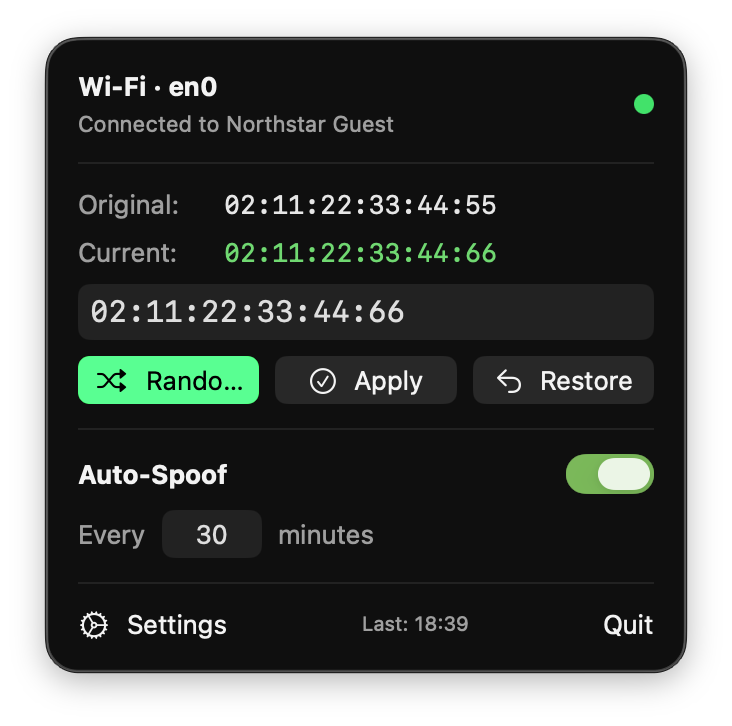
For environments with time-metered captive portals or persistent tracking systems, WiFiSpoof includes an automated rotation engine. Users configure a specific time interval, and the application cycles the device's MAC address entirely in the background. The engine orchestrates the brief network disassociation, applies the new compliant address, and handles the automated reconnection to the saved network profile. A precise countdown is maintained in the application popover, ensuring visibility into the exact moment the next rotation will occur.
CoreWLAN Hardware MAC Recovery
Because temporary MAC addresses are stored in volatile memory by macOS, returning to a known state is critical for joining secure corporate networks that rely on MAC filtering. WiFiSpoof integrates directly with the macOS CoreWLAN framework to query and cache the physical hardware address of the network interface at launch. Users can restore their original, factory-assigned identity at any time with a single click, instantly reversing any active spoofing operations.
Deterministic Manual Entry
In security auditing, penetration testing, or network administration scenarios, users often require a specific, predetermined MAC address rather than a random one. WiFiSpoof provides a validation-backed manual entry interface. Users can input specific hex addresses (with or without standard delimiters), which the application sanitizes, validates for proper formatting, and applies through the same automated disassociation and reconnection flow.
Native Menu Bar Telemetry
The application provides continuous, unobtrusive telemetry via the macOS menu bar. The application icon dynamically updates to reflect the current interface state—indicating whether the device is broadcasting its original hardware MAC, operating under a spoofed identity, or actively running a scheduled rotation cycle. Expanding the popover reveals the current broadcast MAC, the underlying hardware MAC, and the timestamp of the last configuration change.
Architecture & Technical Design
WiFiSpoof is engineered with a strict adherence to native macOS development paradigms, prioritizing security, performance, and minimal system footprint. The application is built entirely in SwiftUI and compiled natively for Apple Silicon (M1 and newer), requiring macOS 14 Sonoma or later.
A critical architectural decision was the approach to privilege escalation. Modifying a network interface (en0) requires root privileges. Rather than installing a persistent, privileged helper daemon—a common practice that expands the attack surface of the host operating system—WiFiSpoof utilizes the standard macOS system authentication dialog. It requests elevated permissions only at the exact moment a state change is required, ensuring that the application operates with standard user privileges during routine background monitoring and timer countdowns.
Network state management relies on native Apple frameworks rather than deprecated command-line utilities. Integration with CoreWLAN provides deterministic reading of hardware states and connection profiles. All processing, including randomization and validation, occurs strictly on-device. The application requires no continuous cloud connectivity to function, operating seamlessly in air-gapped or restricted network environments (contacting external servers only during the initial license validation window).
Use Cases & Scenarios
Penetration Testing and Network Auditing
A security researcher is tasked with evaluating the efficacy of MAC-based access controls on a corporate VLAN. Instead of continuously editing terminal scripts to masquerade as different authorized devices, the researcher uses WiFiSpoof's manual entry feature. They input the captured MAC addresses of legitimate client devices, rapidly applying them to test access segmentation and lateral movement constraints without dropping their workflow.
Circumventing Metered Public Infrastructure
A traveling executive is working from an airport lounge where complimentary Wi-Fi is strictly limited to 30-minute sessions per device. By utilizing the Auto-Spoof Timer set to a 29-minute interval, WiFiSpoof automatically generates a new compliant local MAC address just before the session expires. The device reconnects seamlessly, effectively securing uninterrupted network access for the duration of the layover.
Obfuscating Presence on Untrusted Networks
A journalist operating in a hostile environment must connect to a hotel network known for monitoring guest traffic and hardware signatures. To prevent the network operator from building a behavioral profile tied to their physical device, the journalist clicks "Randomize" upon boot. The device connects using a compliant, locally-administered address, completely masking the hardware's true origin and ensuring physical device anonymity on the local subnet.
Mobile Application Development
A QA engineer is testing how a locally hosted mobile application handles sudden network drops and device identity changes. Instead of manually restarting the local router or turning Wi-Fi on and off, the engineer uses WiFiSpoof to rapidly cycle the host machine's MAC address, triggering the necessary network disassociations and forcing the mobile client application to handle state reconnections under varying network identities.
Pricing & Plans
WiFiSpoof is a locally installed, native macOS desktop application. It is available via subscription or a one-time perpetual license for the v1.x lifecycle. Every plan includes all features without artificial gating.
| Plan | Price | Billing Interval | Included Features |
|---|---|---|---|
| Monthly | EUR 6.00 | Monthly | 14-day trial, all spoofing/automation features, updates, per-device activation. |
| Yearly | EUR 59.00 | Annually | 14-day trial, all spoofing/automation features, updates, 2 months free. |
| Lifetime v1 | EUR 99.00 | One-time | 14-day trial, all spoofing/automation features, all v1.x updates, per-device activation. |
| Enterprise | Custom | Custom | Unlimited usage, dedicated account manager, volume license deployment options, SSO/SAML integrations for licensing. |
Pricing reflects per-device activation for the native downloadable application. Volume licensing is available under custom enterprise terms for deployment across managed fleets.
Frequently Asked Questions
Does WiFiSpoof require administrator rights to function? Yes. macOS strictly enforces that modifying a physical or virtual network interface's MAC address requires elevated permissions. WiFiSpoof utilizes the standard, secure macOS system dialog to request these privileges at the time of execution, completely avoiding the installation of persistent third-party background daemons.
Will my active network connection drop when spoofing? Briefly. To successfully apply a new MAC address, the network interface must temporarily disassociate from the active Wi-Fi network. Once the new MAC is applied at the hardware layer, macOS will automatically attempt to reconnect to your previously saved network. This transition typically resolves within seconds.
Is it possible to revert to my original factory MAC address? Yes. Upon launching, WiFiSpoof queries the CoreWLAN framework to cache your physical hardware MAC address. You can instantly revert to this original factory state at any time by clicking the "Restore" button within the menu bar popover.
Can the application operate without an active internet connection? Yes. The core functionality—generating addresses, managing network interfaces, and cycling timers—is executed entirely locally on your machine. The licensing engine supports offline validation windows and only requires a connection for periodic license refreshes.
What are the system requirements? WiFiSpoof is optimized specifically for modern Apple hardware. It requires macOS 14 Sonoma or later and runs exclusively on Apple Silicon (M1 processors and newer).
Are the generated addresses valid on corporate networks? Yes. The randomization engine explicitly generates locally-administered unicast MAC addresses. By correctly asserting the local bit and unsetting the multicast bit according to IEEE standards, the generated addresses avoid collisions with hardware OUI ranges and prevent routing errors on managed network switches.
Why Amsterdam Technologies
Amsterdam Technologies is an engineering-first software company headquartered in Amsterdam, Netherlands. We focus on building highly optimized, single-purpose utilities that solve complex technical problems without introducing bloat. WiFiSpoof reflects our commitment to the macOS platform—eschewing cross-platform web frameworks in favor of native SwiftUI and direct Apple framework integration to deliver uncompromising performance and security.
By eliminating the operational friction of essential privacy tasks, WiFiSpoof ensures that security practices actually get adopted rather than bypassed. As network surveillance and tracking methodologies grow more sophisticated, we continue to iterate on our native networking tools to keep control firmly in the hands of the end user.
- Website: https://wifispoof.amsterdam-technologies.com
- Contact: support@amsterdam-technologies.com
- Company: amsterdam-technologies.com
Product screenshots